
Citroen C3: Towing / Towing another vehicle
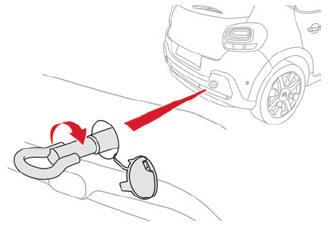
- On the rear bumper, unclip the cover by pressing at the bottom.
- Screw the towing eye in fully, until it reaches a stop.
- Install the tow bar.
- Switch on the hazard warning lamps on both vehicles.
- Set off gently, drive slowly and for a short distance.
 Towing your vehicle
On the front bumper, unclip the cover by
pressing at its left-hand side.
Screw the towing eye in fully.
Install the towbar.
With a manual gearbox, move the gear lever
into neutral...

Other information:
Citroen C3 2016-2026 Owners Manual: Refuelling
Fuel tank capacity: approximately 45 or 47 litres (petrol) or 42 or 50 litres (Diesel). Reserve level: approximately 5 litres. Low fuel level When the low fuel level is reached, one of these warning lamps comes on on the instrument panel, accompanied by an onscreen message and an audible signal. When it first comes on, about 5 litres of fuel remain. Depending on equipment, the low fuel le..
Citroen C3 2016-2026 Owners Manual: Steering-mounted controls
Voice commands: Voice commands can be issued from any screen page after briefly pressing the "Voice commands" button, located on the steering wheel or at the end of the lighting control stalk (depending on equipment), as long as there is no telephone call in progress. To ensure that voice commands are always recognised by the system, please observe the following recommendations: speak in..
Categories
- Manuals Home
- 3rd Generation C3 Owners Manual
- 3rd Generation C3 Service Manual
- Refuelling
- AdBlue® range indicators (BlueHDi)
- CITROËN ConnectedCAM®
- New on site
- Most important about car

Copyright © 2026 www.citroenc3.org