
Citroen C3: Access / Boot
Citroen C3 2016-2026 Owners Manual / Access / Boot
Opening
- With the vehicle unlocked or with the Keyless Entry and Starting electronic key in the recognition zone, press the central tailgate control.
- Lift the tailgate.
Closing
- Lower the tailgate using one of the interior grab handles.
 In the event
of a malfunction or if you
experience difficulty opening or closing
the tailgate, have it checked by a CITROËN
dealer or a qualified workshop without delay,
to avoid the issue deteriorating and prevent
any risk of the tailgate dropping, potentially
causing serious injury.
In the event
of a malfunction or if you
experience difficulty opening or closing
the tailgate, have it checked by a CITROËN
dealer or a qualified workshop without delay,
to avoid the issue deteriorating and prevent
any risk of the tailgate dropping, potentially
causing serious injury.
Back-up release
To manually unlock the boot in the event of a battery or central locking failure.
Unlocking
- Fold the rear seats to gain access to the lock from inside the boot.
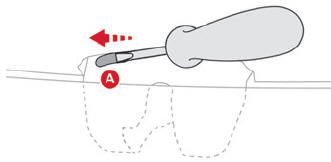
- Insert a small screwdriver into hole A of the lock to unlock the boot.
- Move the latch to the left.
Locking after closing
If the fault persists after closing again, the boot will remain locked.
 In the event of a fault
with the central
locking system, it is essential to
disconnect the battery to lock the boot and so
ensure complete locking of the vehicle.
In the event of a fault
with the central
locking system, it is essential to
disconnect the battery to lock the boot and so
ensure complete locking of the vehicle.
 Doors
Doors
Opening
From outside
After unlocking the vehicle or with the
"Keyless Entry and Starting" system electronic
key in the recognition zone, pull the door handle...
 Central locking
Manual
Press this button to lock/unlock the vehicle
(doors and boot) from inside the vehicle.
The indicator lamp comes on to confirm the
central locking of the vehicle...
Other information:
Citroen C3 2016-2026 Owners Manual: Media
USB socket Insert the USB memory stick into the USB socket or connect the USB device to the USB socket using a suitable cable (not supplied). To protect the system, do not use a USB hub. The system builds playlists (in temporary memory); this operation can take from a few seconds to several minutes at the first connection...
Citroen C3 2016-2026 Owners Manual: Advice
An incorrectly installed child seat compromises the child's safety in the event of an accident. Ensure that there is no seat belt or seat belt buckle under the child seat, as this could destabilise it. Remember to fasten the seat belts or the harness of child seats, keeping the slack relative to the child's body to a minimum, even for short journeys...
Categories
- Manuals Home
- 3rd Generation C3 Owners Manual
- 3rd Generation C3 Service Manual
- Setting the date and time
- Operation
- Automatic air conditioning
- New on site
- Most important about car

Copyright © 2026 www.citroenc3.org