
Citroen C3: Practical information / AIRBUMP® protections
Citroen C3 2016-2026 Owners Manual / Practical information / AIRBUMP® protections
Located on the sides of your vehicle, they protect the bodywork by resisting everyday bumps and scrapes caused by parking posts, opening doors, scratches, etc.
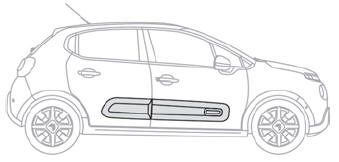
 Maintenance of AIRBUMP®
The AIRBUMP® do not require any specific maintenance.
Clean them using water or one of the products available from a CITROËN dealer. To protect the AIRBUMP® against premature ageing, do not use polish.
 Bodywork
High-gloss paint
Do not use abrasive
products or
solvents, petrol or oil to clean the
bodywork.
Never use an abrasive sponge to clean
stubborn stains...

Other information:
Citroen C3 2016-2026 Owners Manual: Connected navigation
Depending on version Depending on the equipment level of the vehicle Network connection provided by the vehicle OR Network connection provided by the user Connected navigation connection As a safety measure and because it requires sustained attention by the driver, using a smartphone when driving is prohibited. All operations must be done with the vehicle stationary. For access to connec..
Citroen C3 2016-2026 Owners Manual: Navigation
Choice of a destination To a new destination Press Navigation to display the main page. Press the "MENU" button to access the secondary page. Select "Enter address". Select the "Country". Enter the "City", the "Street" and the "Number", and confirm by pressing on the displayed suggestions. Press "OK" to select the "Guidance criteria". And/or Select "See on map" to choose the "Guida..
Categories
- Manuals Home
- 3rd Generation C3 Owners Manual
- 3rd Generation C3 Service Manual
- Door mirrors
- Android Auto smartphone connection
- Cruise control
- New on site
- Most important about car

Copyright © 2026 www.citroenc3.org