
Citroen C3: Safety / Emergency or assistance call
Citroen C3 2016-2026 Owners Manual / Safety / Emergency or assistance call
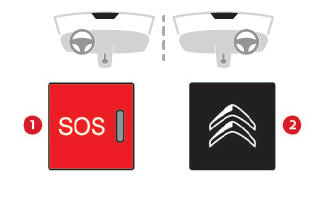
 Hazard warning lamps. Horn
Hazard warning lamps
Pressing the red button causes all the
direction indicators to flash.
They can operate with the ignition off.
Automatic operation of hazard warning lamps
When braking in an emergency, depending on
the rate of deceleration, the hazard warning
lamps come on automatically...
 Localised Emergency Call (PE112)
In an emergency, press button 1 for more
than 2 seconds.
The lighting of the indicator lamp and a voice
message confirm that the call has been made to
the emergency services*...
Other information:
Citroen C3 2016-2026 Owners Manual: Key not detected. Emergency switch-off
Key not detected Back-up starting A back-up reader is fitted to the steering column so that the engine can be started if the system does not detect the key in the recognition zone, or if the battery in the electronic key is flat. Place and hold the remote control against the reader...
Citroen C3 2016-2026 Owners Manual: First steps
With the engine running, a press mutes the sound. With the ignition off, a press turns the system on. Increase or decrease the volume using the thumbwheel on the left-hand side. To access the menus, press this button on the touch screen. Press the back arrow to go back a level...
Categories
- Manuals Home
- 3rd Generation C3 Owners Manual
- 3rd Generation C3 Service Manual
- Automatic air conditioning
- Cruise control
- Android Auto smartphone connection
- New on site
- Most important about car

Copyright © 2026 www.citroenc3.org