
Citroen C3: Child seats / Child seat at the front

- Adjust the front passenger seat to the maximum rear longitudinal position, with the backrest straightened.
"Rearward facing"
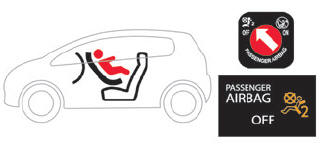
 The front passenger airbag
must be
deactivated before installing a rearward
facing child seat. Otherwise, the child risks
being seriously injured or killed if the
airbag deploys.
The front passenger airbag
must be
deactivated before installing a rearward
facing child seat. Otherwise, the child risks
being seriously injured or killed if the
airbag deploys.
"Forward facing"
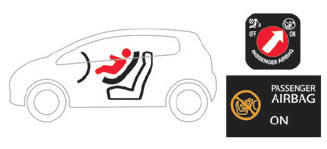
 You must leave the front
passenger
airbag active.
You must leave the front
passenger
airbag active.
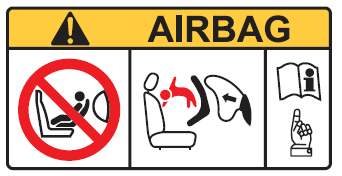
Warning label - Front passenger airbag
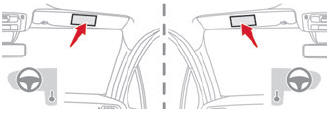
You must comply with the following instruction, reminded by the warning label on both sides of the passenger sun visor:
NEVER use a rearward facing child restraint on a seat protected by an ACTIVE AIRBAG in front of it, DEATH or SERIOUS INJURY to the CHILD can occur.
 Child seat at the rear
"Forward facing" or "Rearward
facing"
Move the vehicle's front seat forward and
straighten the backrest so that the legs of the
child in the "forward facing" child seat or the
"rearward facing" child seat itself do not touch
the vehicle's front seat...
 Deactivating the front passenger airbag
Passenger airbag OFF
For your child’s safety,
the front
passenger airbag MUST be deactivated
when a "rearward facing" child seat is
installed on the front passenger seat...
Other information:
Citroen C3 2016-2026 Owners Manual: Localised Assistance Call
If the vehicle breaks down, press button 2 for more than 2 seconds to request assistance (confirmed by a voice message*). Pressing again immediately cancels the request. Privacy mode allows you to manage the level of sharing (data and/or position) between your vehicle and the CITROËN brand...
Citroen C3 2016-2026 Owners Manual: Telephone
USB sockets Depending on equipment, for more information on the USB sockets compatible with the CarPlay®, MirrorLinkTM or Android Auto applications, refer to the "Ease of use and comfort" section. The synchronisation of a smartphone allows users to display applications adapted to the CarPlay®, MirrorLinkTM or Android Auto technology of the smartphone on the vehicle screen...
Categories
- Manuals Home
- 3rd Generation C3 Owners Manual
- 3rd Generation C3 Service Manual
- ISOFIX child seats
- Manual child lock
- LCD symbols instrument panel
- New on site
- Most important about car

Copyright © 2026 www.citroenc3.org